HP
HP ELITEBOOK 840 G1 4TH GEN
RAM
Internal Memory (GB)
Processor
Touch Ability
Pay Deposit to Preorder Pay in Full
Description
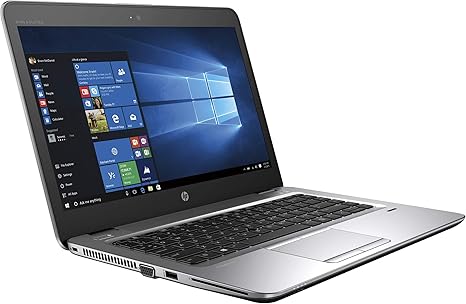
The HP EliteBook 840 G1 is the direct predecessor to the G2 model, featuring the exact same exterior design, chassis, and port layout, but running on older 4th Generation Intel Core i5 or i7 processors.
How it Compares to the 840 G2
Because the G1 and G2 share the exact same physical body, they share many similarities, but the internal hardware differs:
- Slightly Older Processor: The 840 G1 uses 4th-gen chips (e.g., Core i5-4300U) with Intel HD Graphics 4400, which are about 10–15% slower and slightly less power-efficient than the 5th-gen chips in the G2.
- Identical Shell & Port Mix: It features the same rubberized magnesium lid, spill-resistant keyboard, and dual-pointing device (trackpad + trackpoint). It also has no built-in HDMI port, relying instead on full-size DisplayPort and VGA.
- Same Easy Maintenance: Like the G2, it has a toolless slide-off bottom cover. This layout “allows for easy access to internal components such as the hard disk and the two RAM slots by unlocking the back panel without needing a screwdriver.” -- . It supports up to 16GB DDR3L RAM.
Core Technical Specifications
ComponentSpecification Options
Processor
Intel Core i5-4200U / i5-4300U or Core i7-4600U
Graphics
Intel HD Graphics 4400 (Optional discrete AMD Radeon HD 8750M)
Memory
Dual slots supporting up to 16GB DDR3L RAM
Storage
2.5-inch SATA bay + M.2 flash cache slot
Display
14" TN panel, usually HD (1366x768) or HD+ (1600x900)
Ports
4x USB 3.0, DisplayPort, VGA, Ethernet, Audio jack, SD Card Reader
The Verdict for Today
The HP 840 G1 remains a highly reliable "word-processing and office administration" laptop. It handles basic multi-tasking, Zoom meetings, spreadsheets, and web browsing beautifully if paired with 8GB of RAM and an SSD.
However, because it uses a 4th-generation CPU, it is permanently locked out of official Windows 11 updates. If you are looking to buy one, ensure the vendor installs a Solid State Drive (SSD) rather than an old mechanical Hard Disk Drive (HDD); an HDD will make a 4th-gen laptop feel incredibly slow in day-to-day use